Asset management and CAPEX
No asset purchase without approval or control
Requests, approvals and asset verification without emails or spreadsheets.












Who approved that purchase and for how much?
Without a digital workflow, asset purchases are approved by email and get lost.
Asset purchases without an approval workflow
Each location requests equipment by email, WhatsApp or phone call. There is no formal workflow: nobody knows who approved what, when or for how much. Surprises appear at the quarterly close when the numbers don't add up.
Assets without traceability or digital records
You don't know where each piece of equipment is, when it was purchased, whether the warranty is still valid or when maintenance is due. When equipment fails, nobody can find the documentation and a new one is purchased without checking the warranty.
Reception without confirmation or verification
Equipment arrives at the location and is accepted without question. Nobody verifies if it's the correct model, if it arrived complete or if there is damage. When a problem appears, there is no photographic evidence or record of who received what.
How CAPEX Works
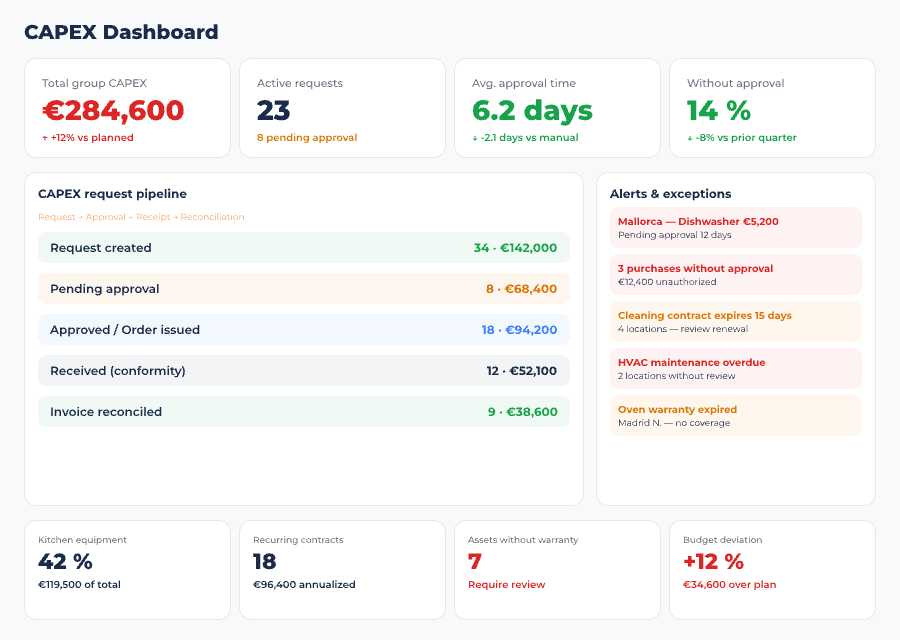
Complete asset management workflow: from the purchase request to verified reception with photos, through multi-level approvals and budget control.
Multi-Level Approvals
A location manager requests equipment from the app. The system automatically routes the request based on the amount, category and cost center. Each approval level receives the request, reviews it and approves or rejects it with one click. No emails, no phone calls, no shared spreadsheets.
- Configurable workflow -- define who approves what based on the amount (for example: up to EUR 500 the area director, above EUR 500 the finance director) and the asset category
- Status visibility -- the requester sees at all times what step their request is at: pending, approved, rejected or awaiting a higher level
- Complete history -- every approval or rejection is logged with date, time and responsible person. Complete audit trail for corporate governance
Digital Asset Record
Every asset in the group has its digital record: current location, purchase date, supplier, cost, warranty, maintenance history and attached documentation. From a single panel you know where each piece of equipment is, its condition and when the warranty expires.
- Location and assignment -- know which location each piece of equipment is at. If it is transferred, the change is automatically logged with date and reason
- Warranty and maintenance -- automatic alerts when a warranty is about to expire or when scheduled maintenance is due. No depending on someone remembering
- Centralized documentation -- invoices, manuals, maintenance contracts and equipment photos in one place. Accessible to any authorized person in the group
Goods Receipt Confirmation
When equipment arrives at the location, the manager opens the app, takes photos of the received asset, verifies it matches what was requested and records the confirmation. If there is damage, a missing component or the wrong model, it is documented with photographic evidence before signing the acceptance.
- Photographic evidence -- photos of the equipment at the moment of reception. If there is a problem later, you have documentation of how it arrived
- Verification checklist -- the team follows a configurable checklist: correct model, packaging condition, complete components, initial operation
- Incident logging -- if the reception is not satisfactory, an incident is automatically opened linked to the order and the supplier. Full traceability for claims
Investment Budget Control
Real-time visibility of the investment budget: how much has been approved, how much has been executed, how much remains available. By location, by category and by period. No waiting until the close to know if you've exceeded the budget.
- Budget by location and category -- assign investment budget by location, by asset type or by period. The system automatically tracks consumption
- Deviation alerts -- if a location approaches the budget limit, the system warns you before it is exceeded. No surprises at the quarterly close
- Executive reporting -- budget execution reports by location, category and period. Data ready for the board meeting without manually preparing presentations
Measurable Impact on Investment Control
Discover how asset management and CAPEX applies to your operations
Request a Free DemoCAPEX Within the Cycle
CAPEX is not an isolated module. It integrates with operational purchasing and group management to provide complete spend visibility.
Request and approval
The location requests an asset from the app. The workflow automatically routes it to the correct approver based on amount and category. No emails, no phone calls, no losing track of who requested what.
Purchase and reception
The approved purchase is executed within the same system that manages operational purchasing. When the equipment arrives, it is verified with photos and a checklist before confirming acceptance.
Asset lifecycle
The asset is registered with its digital record: location, warranty, scheduled maintenance and documentation. The investment data is exported to the ERP for accounting and financial consolidation.
CAPEX Adapted to Each Sector
The same asset management system, adapted to the operational context of your sector.
Restaurants
Kitchen equipment, furniture and renovations under control. Approvals by amount and location for chains and franchises.
Hotels
F&B asset management and hotel equipment. Investment control by hotel and department with full traceability.
Food Service
Central kitchen and service point equipment. Budget control by contract and location for multi-site operators.
Frequently asked questions about CAPEX
What is CAPEX management in a HORECA group?
Control of non-food investments and purchases —equipment, refurbishments, furniture— with an approval workflow by amount and documented goods receipt confirmation, so no investment goes ahead without oversight.
How does it differ from food purchasing?
Food purchases are recurring and low-value; CAPEX is one-off, high-value and needs multi-level approval and asset tracking throughout its life cycle. That's why it has its own workflow.
Does Controliza replace my financial ERP?
No: it complements it. Your ERP posts the investment to the accounts; Controliza governs the purchase beforehand —who approves it, at what price, what was actually received— which is where overspend is prevented.
How does it control the receipt of an asset?
With goods receipt confirmation and photographic evidence: it verifies that what was received matches what was approved before the purchase is signed off. No surprises on the invoice.

